![The [RE]Search Co.](https://re-search.co/wp-content/uploads/2025/02/The-RE-Search-Co-Orange_Grey-png-350x51.avif)

Efficient meeting room management is crucial for most businesses. With numerous meeting room booking systems available, selecting the right one can significantly impact efficiency. Here (in no particular order), we explore the 10 most popular meeting room booking systems on the market, their features, and how they cater to various requirements.
1. Microsoft Teams Rooms
Microsoft Teams Rooms is an extension of Microsoft Teams, designed to facilitate seamless booking and management of meeting spaces. Its integration with Office 365 ensures a smooth user experience, allowing employees to schedule meetings effortlessly. Key features include:
-
- Integrated Scheduling: Users can book rooms directly from their Outlook calendar, eliminating the need to switch between different applications.
-
- Device Management: Manage meeting room devices centrally, ensuring that all hardware is functioning correctly and is up-to-date.
-
- Collaborative Tools: Enhanced video conferencing and collaboration tools make remote meetings more effective and engaging.
-
- User-Friendly Interface: A straightforward interface that users are familiar with, reducing the learning curve and increasing adoption rates.
-
- Scalability: Suitable for small businesses to large enterprises, ensuring that the solution grows with your organisation.
-
- Secure Access: Ensures data protection and privacy, which is critical for organisations handling sensitive information.
2. Robin
Robin offers a user-friendly interface and integrates with popular calendar systems like Google Calendar and Outlook. It’s known for its comprehensive analytics, which help optimise space utilisation. Notable features include:
-
- Real-Time Availability: Check room availability in real-time, preventing double bookings and ensuring efficient use of meeting spaces.
-
- Interactive Maps: Navigate office space with ease, helping employees find and book rooms quickly.
-
- Data-Driven Insights: Utilise analytics to improve space management, identifying underutilised areas and opportunities for optimisation.
-
- Mobile App: Book and manage meetings on-the-go, ensuring flexibility and accessibility.
-
- Visitor Management: Streamline the check-in process for guests, enhancing the visitor experience and improving security.
-
- Room Display Panels: Place digital displays outside meeting rooms to show current bookings and availability status.
3. Condeco
Condeco is a robust meeting room booking solution that includes features for room booking, desk booking, and visitor management. It integrates seamlessly with major calendar platforms and offers detailed reporting. Key features include:
-
- Advanced Booking Rules: Set up custom booking rules to manage space effectively, ensuring that resources are used efficiently.
-
- Visitor Management: Streamline the process of welcoming guests, including pre-registration and automated notifications.
-
- Comprehensive Analytics: Access detailed reports on room usage, helping you make informed decisions about space planning and utilisation.
-
- Scalable Solutions: Whether you need a simple booking system or a comprehensive workspace management tool, Condeco can be tailored to fit your needs.
-
- Touchscreen Panels: Install touch panels outside meeting rooms for quick booking and real-time updates.
-
- Workspace Management: Manage not just meeting rooms, but also desks, parking spaces, and other office resources.
4. Teem
Teem is renowned for its ease of use and comprehensive feature set. It integrates with Google Workspace and Office 365, providing real-time room availability and utilisation analytics. Key features include:
-
- Simple Interface: User-friendly design for easy booking, reducing the learning curve for new users.
-
- Check-In Functionality: Ensure rooms are used as booked, freeing up space if a meeting is cancelled or no-showed.
-
- Detailed Analytics: Gain insights into room utilisation patterns, helping to optimise space and improve resource allocation.
-
- Visitor Management: Manage guests with ease, ensuring a smooth check-in process and better security.
-
- Mobile App: Book and manage meetings from anywhere, enhancing flexibility and convenience.
-
- Room Scheduling Displays: Digital displays outside rooms to show booking information and room status.
5. Skedda
Skedda is a flexible booking system suitable for meeting rooms, desks, and other resources. It offers customisable booking rules and detailed reporting. Notable features include:
-
- Customisable Booking Rules: Tailor rules to suit your organisation’s needs, ensuring that resources are allocated efficiently.
-
- Online Payments: Manage payments for bookable spaces, making it ideal for coworking spaces or venues.
-
- Reporting and Analytics: Track and analyse space usage, identifying trends and areas for improvement.
-
- Self-Service Portal: Allow users to manage their own bookings, reducing administrative overhead.
-
- Integration: Works seamlessly with calendar systems and other tools, ensuring a smooth workflow.
-
- User Permissions: Set different access levels for users, ensuring that only authorised personnel can book certain spaces.
6. Roomzilla
Roomzilla is a web-based room booking system that integrates with various calendar platforms. It provides a simple interface and real-time room availability. Key features include:
-
- Easy Integration: Works with Google Calendar, Outlook, and more, ensuring a seamless user experience.
-
- Real-Time Availability: View available rooms instantly, preventing double bookings and improving efficiency.
-
- Mobile-Friendly: Book rooms on-the-go using mobile devices, ensuring flexibility for remote or mobile employees.
-
- Customisable Interface: Tailor the look and feel of the booking system to match your brand.
-
- Affordable Pricing: Suitable for small to medium-sized businesses with budget constraints.
-
- Room Displays: Use digital displays to show room availability and booking information outside each meeting room.
7. EMS Software

EMS Software offers a comprehensive solution for managing meeting spaces, desks, and other resources. It provides extensive customisation options and integrates with various calendar systems. Key features include:
-
- Customisation Options: Tailor the system to meet specific needs, from booking rules to reporting features.
-
- Advanced Reporting: Access detailed reports on space utilisation, helping to make data-driven decisions.
-
- Seamless Integration: Works with major calendar platforms, ensuring a smooth user experience.
-
- Visitor Management: Manage guests efficiently, improving security and visitor experience.
-
- Enterprise-Grade Security: Ensure data privacy and security, critical for larger organisations.
-
- Room Panels: Use digital panels outside rooms to display booking information and availability status.
8. Joan

Joan combines hardware and software to offer an elegant meeting room management solution. Using e-ink displays, Joan integrates with popular calendar systems, providing a simple way to manage room bookings. Key features include:
-
- E-Ink Displays: Low power consumption and high visibility, ideal for displaying room status and bookings.
-
- Calendar Integration: Syncs with Google Calendar, Outlook, and more, ensuring a seamless experience.
-
- Easy Installation: Simple setup and maintenance, with no need for extensive cabling or installation.
-
- Battery-Powered: Long battery life, reducing the need for frequent maintenance.
-
- Real-Time Updates: Ensure that room status is always up-to-date, preventing double bookings and confusion.
-
- Customisable Display: Adjust the display settings to match your company’s branding and needs.
9. SpaceIQ

SpaceIQ focuses on workplace management, including meeting room booking, desk booking, and space planning. It integrates with major calendar systems and provides analytics to optimise space usage. Key features include:
-
- Space Planning Tools: Plan and manage office space effectively, ensuring optimal utilisation.
-
- Booking Flexibility: Book meeting rooms and desks easily, accommodating various workspace needs.
-
- Data-Driven Decisions: Utilise analytics for better space management, identifying trends and opportunities for improvement.
-
- Integration: Seamlessly integrates with existing tools, ensuring a smooth workflow.
-
- Customisation: Tailor the system to fit your organisation’s specific needs, from booking rules to reporting features.
-
- Occupancy Sensors: Use sensors to track real-time space usage, providing accurate data for decision-making.
10. Logitech

Logitech (previously Meetio) combines software and hardware to manage meeting rooms and other spaces effectively. It integrates with popular calendar systems and provides real-time room availability and usage analytics. Key features include:
-
- Real-Time Updates: View room status instantly, ensuring efficient use of space and preventing double bookings.
-
- User-Friendly Interface: Intuitive design for easy booking, reducing the learning curve for new users.
-
- Detailed Analytics: Analyse room usage patterns, helping to optimise space and improve resource allocation.
-
- Integration: Works with Google Calendar, Outlook, and other tools, ensuring a seamless user experience.
-
- Mobile App: Book and manage meetings from anywhere, enhancing flexibility and convenience.
-
- Digital Room Displays: Use displays outside rooms to show current bookings and availability status.
Choosing the Right Meeting Room Booking System
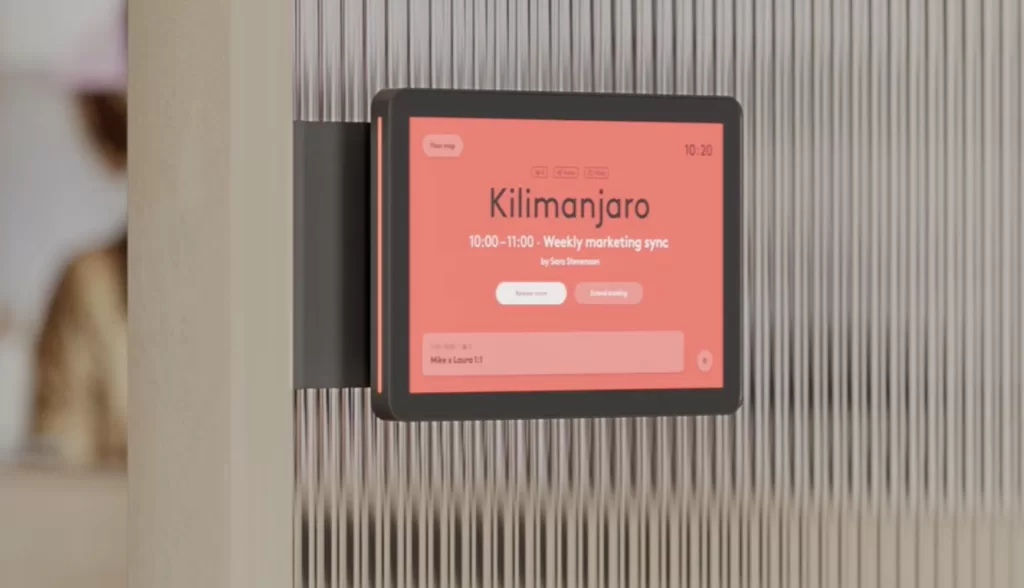
When selecting a meeting room booking system, consider the following factors to ensure it meets your needs:
-
- Integration: Ensure the system integrates seamlessly with your existing tools, such as Google Workspace or Office 365. This reduces friction and encourages adoption.
-
- Ease of Use: Choose a system with a user-friendly interface to encourage adoption among employees. A complicated system can lead to underutilisation.
-
- Scalability: Select a solution that can grow with your organisation and accommodate increasing demands. This ensures that your investment remains valuable as your needs evolve.
-
- Customisation: Look for systems that offer customisable booking rules and reporting features. This allows you to tailor the system to your specific needs.
-
- Analytics: Opt for a system that provides detailed analytics to help you make data-driven decisions about space management. This can help identify trends and optimise resource allocation.
-
- Cost: Evaluate the cost of the system in relation to the features it offers. Ensure it provides value for money and fits within your budget.
-
- Support: Consider the level of customer support offered. Reliable support can help resolve issues quickly and ensure the system runs smoothly.
The Benefits of an Efficient Meeting Room Booking System
Implementing an efficient meeting room booking system offers several benefits for organisations, including:
-
- Optimised Space Utilisation: Ensure meeting rooms and other resources are used effectively, reducing wasted space and improving efficiency.
-
- Increased Productivity: Simplify the booking process, allowing employees to focus on their core tasks without the hassle of finding and booking rooms.
-
- Enhanced Collaboration: Facilitate seamless meeting scheduling and management, improving collaboration and communication within the team.
-
- Data-Driven Decisions: Use analytics to gain insights into space usage and make informed decisions about space planning and allocation.
-
- Improved Visitor Management: Streamline the process of welcoming guests and managing visitor information, enhancing security and visitor experience.
-
- Cost Savings: By optimising space usage, organisations can potentially reduce the need for additional office space, leading to cost savings.
-
- Employee Satisfaction: A smooth and efficient booking system can improve employee satisfaction by reducing frustration and ensuring meeting spaces are readily available.
In Summary
Selecting the right meeting room booking system is essential for optimising valuable space and streamlining operations. With various options available, including the leading solutions listed above, organisations should be able to find a solution that meets their specific needs.
By considering factors such as integration, ease of use, scalability, customisation, analytics, cost, and support, you can ensure that the chosen system will effectively support your organisation’s requirements.